Silverlight on Expression Blend with AVG Anti-Virus
Just prior to MIX07 and the Silverlight announcements, Microsoft has released another CTP of Expression Blend. It's called the 2 May Preview and can be downloaded here.
I've been trying to do Silverlight projects by hand (or, at least in Visual Studio 2005). This is entirely do-able, but the lack of a XAML schema for Silverlight (the XAML used for full WPF apps will often conflict with what Silverlight allows) makes this difficult. I would rather use the tool that's made for Silverlight. I also want to keep from installing Orcas which is still in Beta 1.
Since most tutorials seem to be using Expressions Blend at the moment, I know that this is the tool I should use.
The problem with the new preview version of Blend is that it conflicts with the AVG anti-virus suite. When creating a Silverlight 1.0 project, Blend creates a default project with the following files:
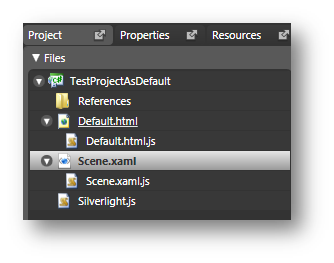
This project can be opened in both VS2005 and Blend. In fact, you are encouraged to use both tools to create a valid SL project.
With AVG anti-virus, this project as it stands does not run. Hit F5 and you get a "hidden extension" error from AVG:
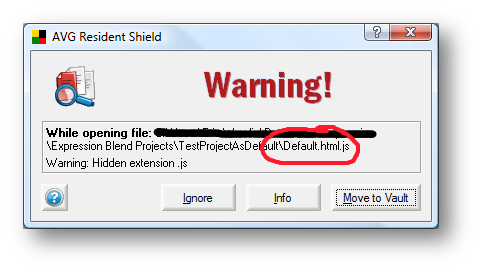
It sees Default.html.js as a potential threat and will not render the page. It will even prevent you from viewing the source (unless you drag it into Notepad). Neither Visual Studio nor Blend will let you change the name of the file because it is a dependent object of default.html.
I initially tried to find a way to turn off this virus check so I could develop in the Expression Blend IDE. If I couldn't turn it off, I would drop AVG altogether (I have a paid license lasting 18 more months).
Then it occurred to me, I need to find a way to work with both AVG and Blend for two reasons:
- Even if I was able to build the project and deploy on my machine without AVG, any client machine that tried to run it with AVG would get this message. This would probably give my site a bad name if the average user considered my webpage to include viruses.
- If another virus like iloveyou.txt starts to spread, I actually want my AV to keep an eye out for anything trying to trick me or dupe my system.
So, after playing with the project files for a few hours, I found this workaround:
Resolution
Create a new Silverlight Project in Blend and Save it.
Make note of the project location.
Close Expression Blend.
Navigate to the project directory in Windows Explorer.
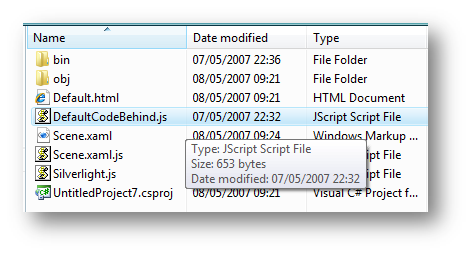
Change the name of the file "Default.html.js" to something with only one extension.
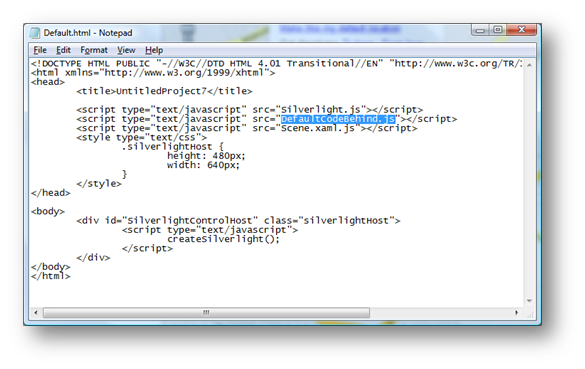
I changed my file to DefaultCodeBehind.js.
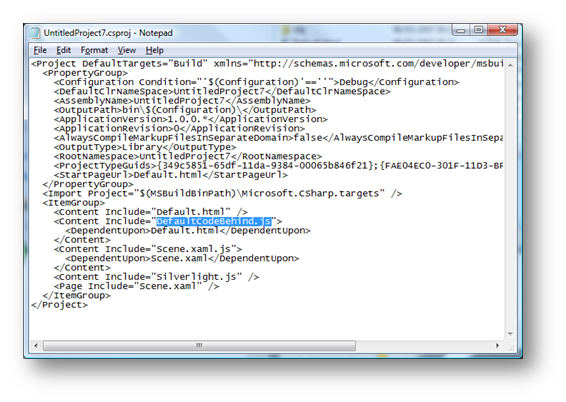
Open the project file in Notepad and change the reference to the new file name.
Open the .csproj file or the .vbproj file using Notepad.
Open Default.html in Notepad and change the references on the includes to the new file name.
Alternatively, this can be edition in Visual Studio.
Open the project again in Blend.
All should be working fine now. <